
LinkedIn is useful because it is strict. That is the uncomfortable tradeoff.
If LinkedIn let everyone have fake profiles, automate DMs, fake engagement, the platform would become unusable very fast.
But LinkedIn also makes life hard for people who use it as a daily work surface: sales teams, recruiters, and content creators.
They need more than what LinkedIn natively offers.
Sometimes, LinkedIn arguably goes too far.
There is even an online petition against LinkedIn for checking whether you have certain Chrome extensions installed when you open the site:
You can test it yourself: open LinkedIn in your browser, then open the browser console.
You’ll see logs showing LinkedIn checking whether you have any of those extensions installed:
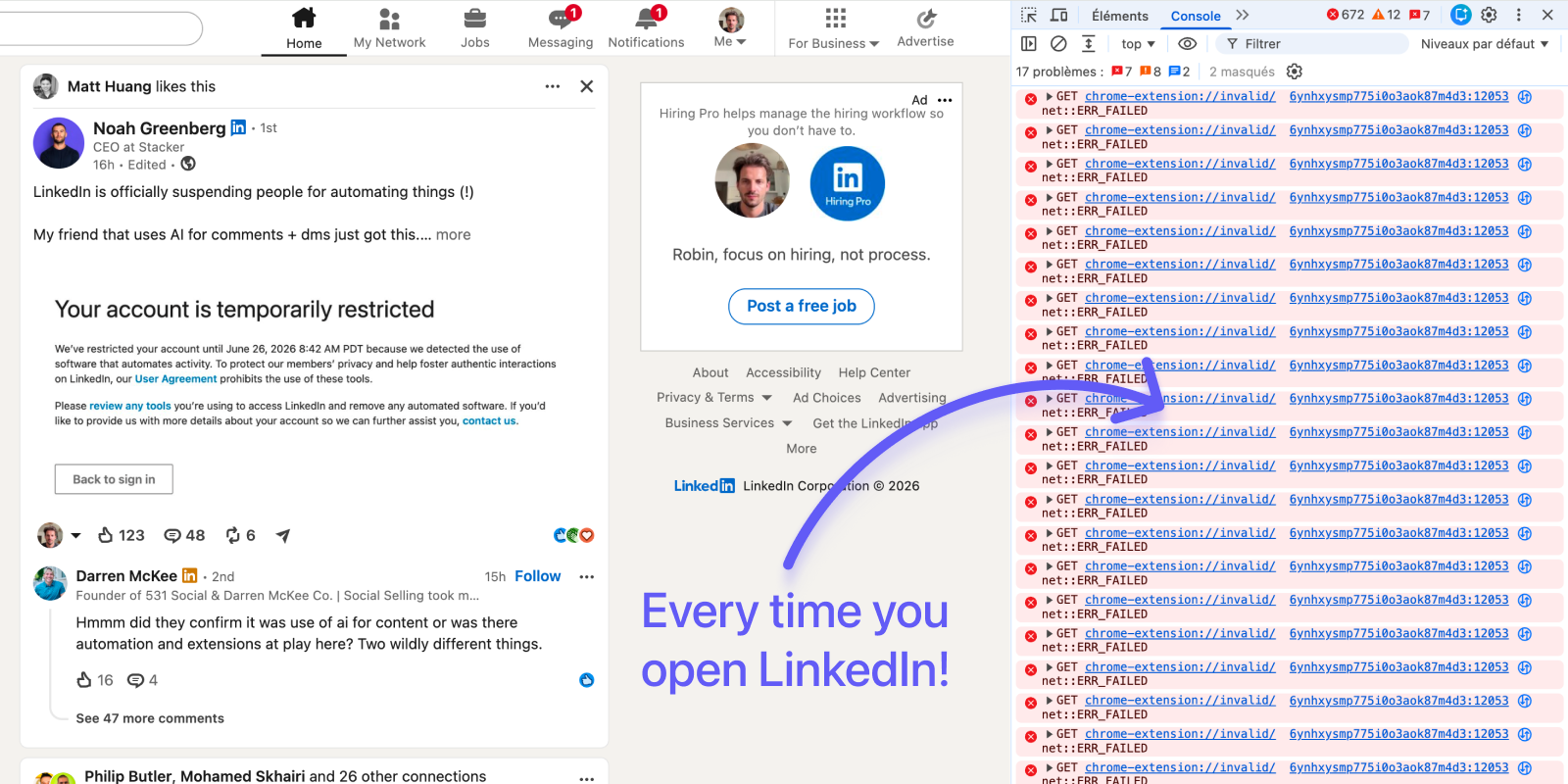
Whether you agree with that approach or not, it illustrates one thing clearly:
LinkedIn invests heavily in identifying third-party software.
So people turn to LinkedIn tools. Some are relatively harmless, while others carry significant risk.
Short answer: LinkedIn automation tools are most likely to create trouble when they combine high volume, repetitive outreach, scraping, artificial timing, or remote cloud infrastructure. A lower-volume browser-based tool may reduce some of those signals, but no third-party tool is risk-free.
LinkedIn risk is mostly about behavior, not one magic limit
There is no universal safe number. That is the first thing to understand.
Sending 30 thoughtful messages from a warm, established account is not the same as sending 30 templated messages after 100+ of profile views, 10+ of searches, perfectly regular timing, and little or no real conversation.
A better way to think about it is that LinkedIn appears to maintain a kind of hidden trust score for every account.
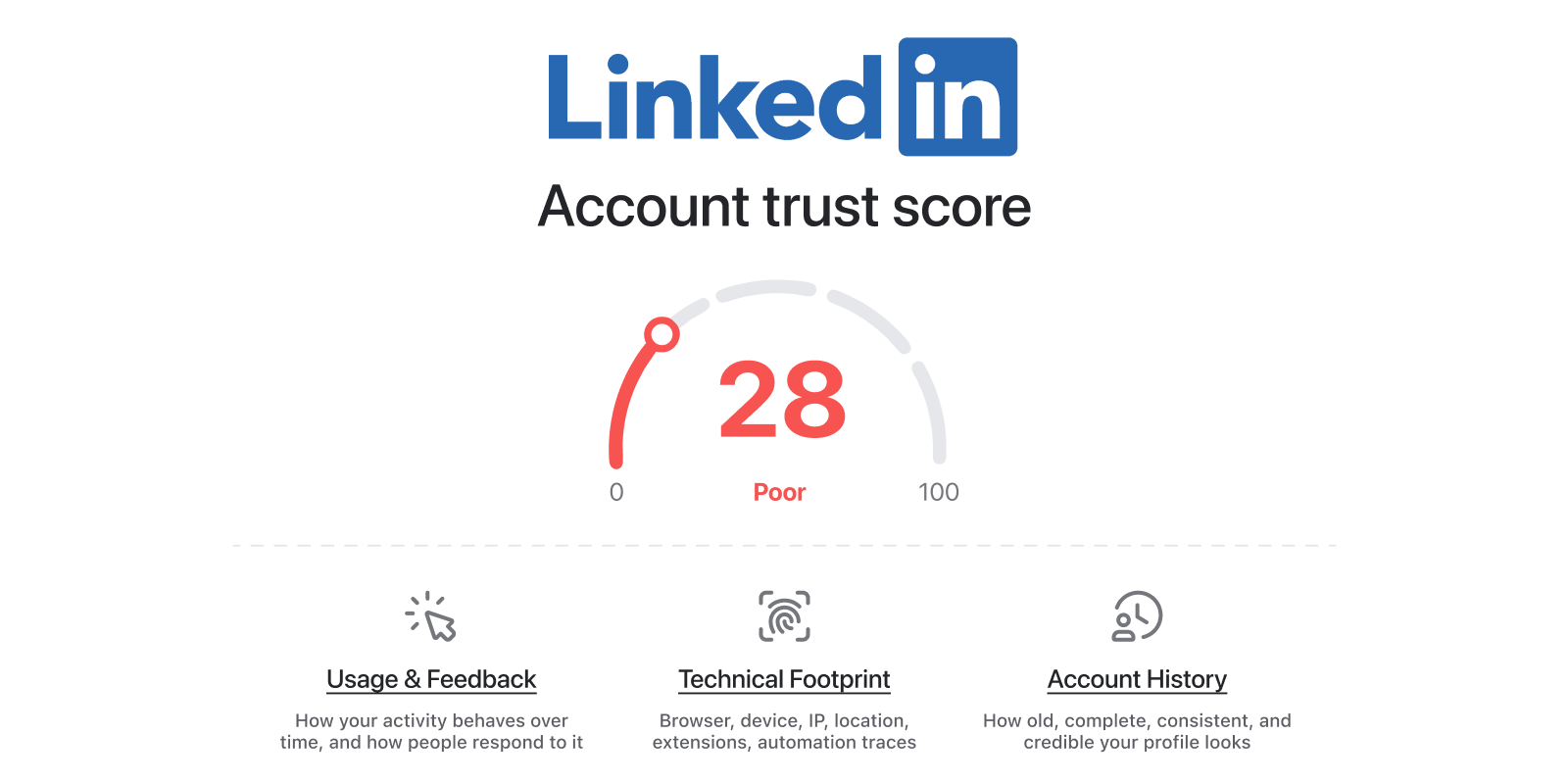
Nobody outside LinkedIn knows how such a system works internally.
But if you look at the kinds of abuse LinkedIn tries to stop, a useful mental model is that your account is constantly building or losing trust across three broad dimensions:
Usage & Feedback
How your activity behaves over time, and how other people respond to it.
Examples include:
→ viewing profiles, searching, messaging, and inviting people
→ how quickly or consistently you perform actions
→ reply rates, acceptance rates, and ignored invitations
→ spam reports and other negative feedback
Technical Footprint
What your setup reveals about how you’re accessing LinkedIn.
Examples include:
→ browser, device, IP, and location consistency
→ browser extensions and automation traces
→ cloud browsers, remote infrastructure, or other technical signals that may suggest automation
Account History
How old, complete, consistent, and credible your account appears.
Examples include:
→ account age
→ profile completeness and authenticity
→ network size and growth over time
→ long-term usage patterns and reputation
→ whether your account has accumulated previous trust or prior warning signals
The exact weighting is unknown, but the overall pattern is straightforward:
LinkedIn cares less about what your tool claims to be and more about whether it makes your account look like a real, trusted human, or automated software.
The biggest risk signal is unnatural change
A dormant account suddenly becoming a high-output sales machine is suspicious.
A normal active user might view profiles, send messages, comment, reply, search, open conversations, accept requests, and follow up throughout the day.
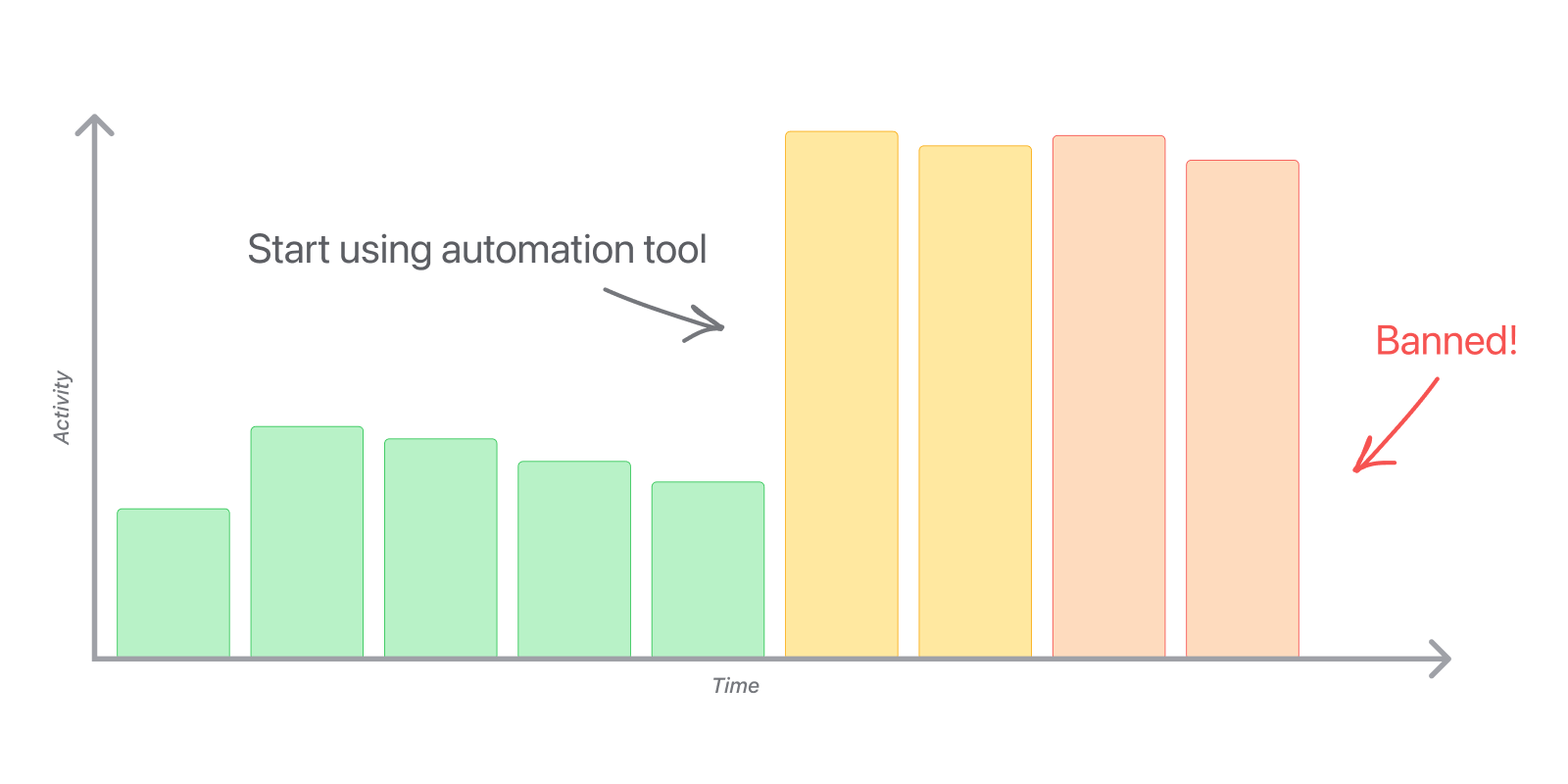
A tool often creates a different shape:
→ a spike in profile views
→ repeated searches
→ fixed delays between actions
→ identical flows every day
→ messages with similar structure
→ low replies
That is the “slide and spike” pattern.
Quiet for weeks. Install a tool. Suddenly the account moves like software.
This is why “safe limits” advice is often not enough. The same number can be normal for one account and risky for another.
LinkedIn usually adds friction before it bans
LinkedIn rarely jumps straight from “fine” to “permanent ban”, even if that can happen.
There is usually a ladder:
| Stage | What it can look like | What may trigger it |
|---|---|---|
| ⚠️ 1. Soft warning | “We noticed unusual activity.” Nothing is blocked yet. | Activity that looks automated, suspicious, or inconsistent with your normal behavior. |
| 🚧 2. Feature limit | You temporarily cannot view more profiles, send invitations, or perform some actions. | High volume, invitation issues, scraping-like behavior, or suspected automation. |
| 🔒 3. Account restriction | You are locked out until you verify, appeal, or wait. | Automated-tool violations, fake-identity signals, compromised-account signals, or spam patterns. |
| ⛔ 4. Permanent restriction | Your account is permanently restricted. | Serious or repeated violations, abuse, or persistent automation. |
| 🪪 5. Fake-account removal | The account is blocked at signup or removed later. | Fake identity, synthetic behavior, coordinated abuse, or platform manipulation. |
If LinkedIn shows an automation tool warning, unusual activity message, repeated login prompt, expired session, invitation limit, profile-view limit, or verification prompt soon after tool usage, treat it as a warning.
Do not push harder!
Uninstall the tools. Reduce volume. Let the account cool down.
LinkedIn detects tools in two ways
LinkedIn risk has two broad layers:
- Behavioral detection
- Technical detection
1. Behavioral detection
Every action on LinkedIn creates requests.
| Signal | Risk | Why it matters |
|---|---|---|
| Mass profile visits | 🔴 Very high | High view volume in a short period is one of the clearest scraping-like patterns. |
| High-volume search or list-building | 🟠 High | Even with no messages, repeated searches and exports can look like data harvesting. |
| Mass connection requests | 🟠 High | LinkedIn limits invitations and can restrict accounts that send too many or get ignored. |
| Repeated commercial messages | 🟠 High | Repetitive, irrelevant outreach looks like spam when replies are low. |
| Bulk engagement | 🟡 Medium-high | Automated likes, comments, follows, and visits are still inauthentic signals. |
| Robotic timing | 🟡 Medium-high | Humans do not act every 47 seconds all afternoon. |
| Shallow sessions | 🟡 Medium | Opening profiles for seconds with no reading, replies, or browsing makes the account look hollow. |
2. Technical detection
Some tools leak signal before they do much.
| Signal | Risk | Why it matters |
|---|---|---|
| Detectable extension footprint | 🔴 Very high | LinkedIn prohibits plug-ins/extensions that scrape, modify the site, or automate. Easy-to-fingerprint tools carry more risk. |
| Scraping or mass data extraction | 🔴 Very high | No outreach needed. Large-scale extraction can look risky by itself. |
| Automated browser actions | 🔴 Very high | Auto-invites, messages, likes, follows, visits, and exports create visible behavior patterns. |
| Cloud-based automation | 🟠 High | Remote infrastructure has to imitate your browser, location, and behavior. |
| Automation-framework signatures | 🟠 High | Headless browsers, robotic control, and shared infrastructure are classic bot signals. |
| Aggressive page injection | 🟡 Medium-high | Heavy UI modification leaves detectable traces. |
| Device, IP, or location inconsistency | 🟡 Medium-high | Location jumps, parallel sessions, and VPN churn can look like account takeover. |
This explains why two tools can do similar jobs and carry very different risk.
The riskiest LinkedIn tools optimize for scale
The closer a tool gets to “fetch everything” or “send everything,” the more risk it usually creates:
| Tool type | Core behavior | Risk |
|---|---|---|
| Manual LinkedIn usage | Human usage only | 🟢 Very low |
| Official LinkedIn APIs | Authorized, whitelisted access | 🟢 Very low |
| Manage contacts & DMs tools | Organize conversations, send messages | 🟢 Low |
| Content scheduling and analytics | Mostly content workflow | 🟢 Low |
| Bulk LinkedIn export | Large-scale profile or list extraction | 🟡 Medium to High |
| Outreach automation | Automated invites and messages from remote infrastructure | 🔴 High |
| Scraping infrastructure | Mass extraction, fake accounts, proxies | 🔴 Very high |
The dangerous tools tend to advertise the same things:
→ export thousands of leads
→ run outbound on autopilot with AI
→ bypass LinkedIn limits
Want to automate LinkedIn while reducing risk as much as possible?
If you decide to automate parts of your LinkedIn workflow, you can remove many avoidable risk signals:
→ Use your own account, and only one account. Do not rotate between profiles or operate an account that belongs to someone else.
→ Start with an established account that you already use normally. An older account with a complete profile, a real network, and regular human activity has a more credible history than a new or dormant one.
→ Verify your profile on LinkedIn. Complete LinkedIn's identity or workplace verification if it is available to you.
→ Keep your profile, content, and conversations human. Do not use an AI-generated profile picture or publish fully AI-generated posts, comments, or messages.
→ Do not share your LinkedIn credentials. This is especially risky when someone else logs in from another part of the world. Sudden changes in location, device, and session behavior can resemble an account takeover.
→ Use one LinkedIn tool at a time. Ideally, choose one browser-based tool that runs from your own session instead of a cloud-based platform. Multiple tools cannot reliably coordinate your total activity.
→ Avoid adding untracked activity in LinkedIn itself. If your tool sends connection requests or cold messages, avoid sending more of them directly in LinkedIn at the same time. Otherwise, the tool cannot know your real total or keep activity within its safeguards.
→ Ramp up progressively over several days. Start with low activity and increase it gradually. A sudden burst after installing a tool is exactly the pattern you want to avoid.
How to choose a safer LinkedIn tool
LinkedIn's rules are intentionally broad and encompass pretty much all existing LinkedIn tools.
The question then is if the tool creates more or fewer signals that make your account look automated.
Three principles matter most:
1. Run from your real browser
Tools that execute through your own browser session avoid many of the signals created by remote cloud browsers, shared IPs, and synthetic environments.
2. Avoid tools built for scale first
If a product's main promise is exporting thousands of profiles or launching massive campaigns, it is probably generating exactly the type of behavior LinkedIn tries to detect.
3. Choose software that keeps you in control
This naturally makes the activity look less automated.
Why we built TalkToHumans this way
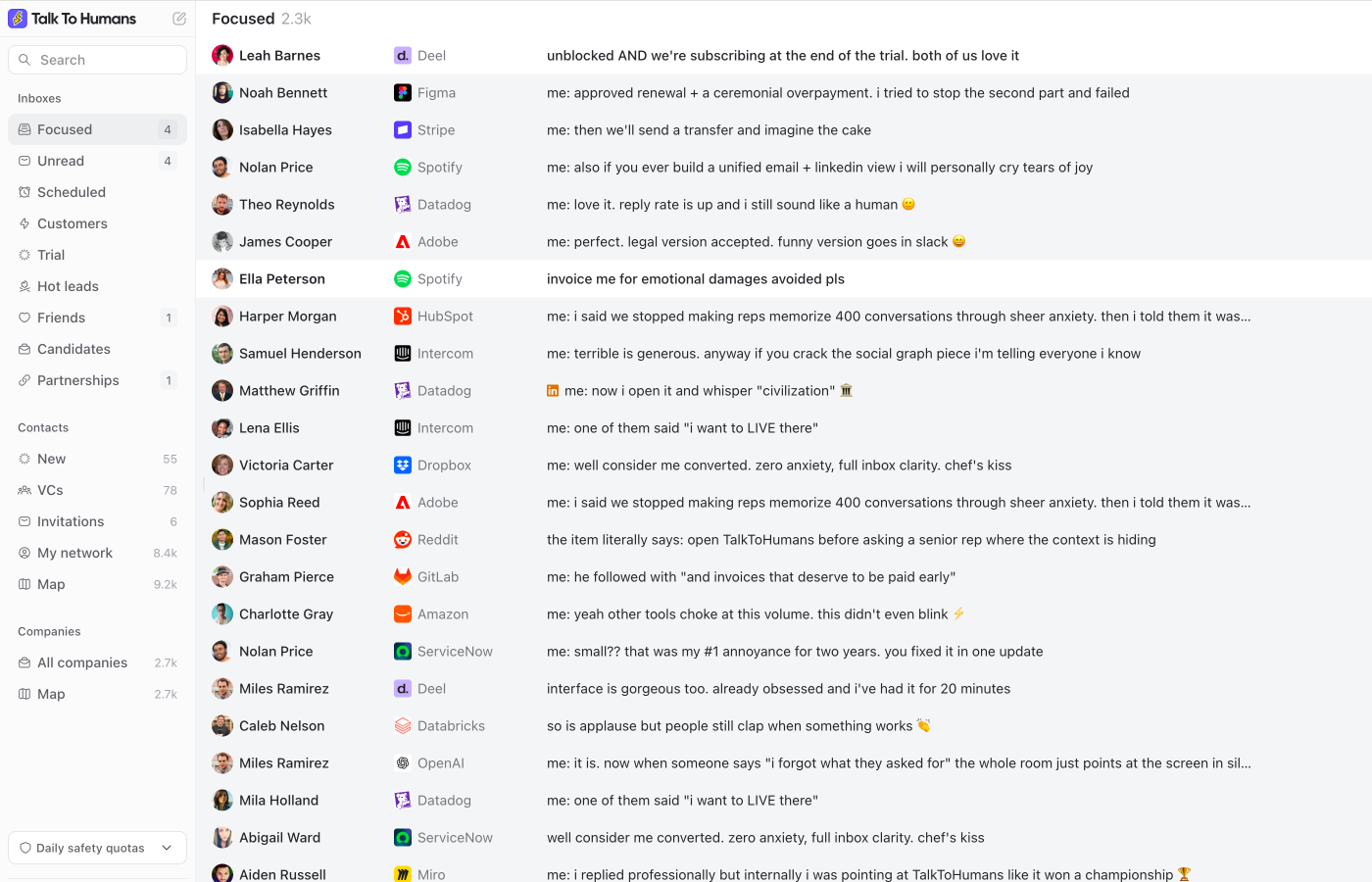
After years of building LinkedIn software, we designed TalkToHumans around one simple idea:
Help people work on LinkedIn, not automate LinkedIn at scale.
That leads to very different product decisions.
If you want AI to spray generic DMs while you sleep, this is not it.
Instead:
- Everything runs from your own browser session, not remote cloud infrastructure like most LinkedIn tools.
- The product is built for fast humans, not background automation. Keyboard-first workflows and an opinionated interface let you move through LinkedIn incredibly quickly while staying in control of every action.
- The app encourages human-paced usage instead of industrial-scale activity. The goal isn’t to replace you, it’s to remove the friction between you and LinkedIn.
As you’ve seen throughout this article, those decisions remove some of the biggest technical and behavioral risk factors associated with third-party LinkedIn tools.
If that sounds like the way you want to use LinkedIn, we’d love for you to try TalkToHumans.
You can start with a free 7-day trial and see whether it fits the way you work.